
Best Controller Charging Stations (PS/Xbox)
Article
2026-01-22 • 5 min read

Best Controller Charging Stations (PS/Xbox)

Best Controller Charging Stations (PS/Xbox). Gaming setups have evolved far beyond a single console and a TV. A well-chosen controller charging station can tidy cables, extend battery life, and keep your play session uninterrupted. For players who own PlayStation and Xbox systems, a reliable charging dock is more than a convenience; it’s a small hub that unifies your gear.

Gaming setups have evolved far beyond a single console and a TV. A well-chosen controller charging station can tidy cables, extend battery life, and keep your play session uninterrupted. For players who own PlayStation and Xbox systems, a reliable charging dock is more than a convenience; it’s a small hub that unifies your gear. This article surveys the landscape of charging stations tailored for PS and Xbox controllers, compares top brands and retailers, and offers practical guidance on choosing and using these devices.

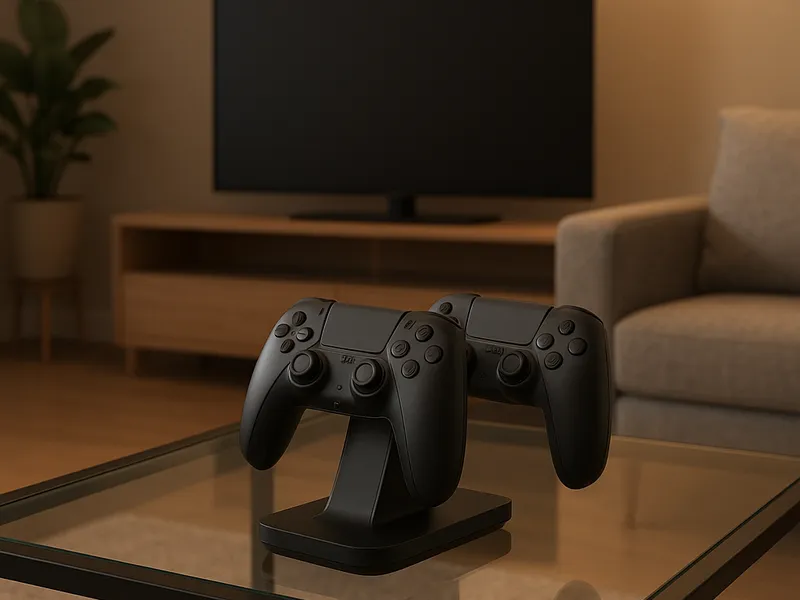
First, what makes a good controller charging station? At minimum, you want a dock that securely seats the controller and reliably replenishes its battery without overheating. The best options support both current generations and, in many cases, older versions, so a single dock can cover your PlayStation DualSense or Xbox Wireless Controller across generations. Aesthetics matter too: a slim, unobtrusive design that fits near your entertainment setup or desk helps your space feel organized rather than cluttered. Features such as visible charging indicators, quick-charge capabilities, and integrated power adapters are nice-to-have rather than essential, but they significantly affect everyday use. Finally, price and build quality are worth balancing. A cheap dock that fails after a few months ends up costing more in replacement than a mid-range, well-built unit.

Official brands offer a strong starting point for reliability. For PlayStation fans, the Sony PlayStation DualSense Charging Station is a purpose-built option designed to cradle DualSense controllers and deliver power from a compact, integrated supply. The shape and finish are consistent with Sony’s hardware aesthetics, and the dock is typically compact enough to sit neatly next to a PS5 or PS4. It excels in simplicity: just place the controllers on the dock, and the charge indicators let you know when power flows. For Xbox users, Microsoft’s own charging stands and play-and-charge kits are common recommendations. These products are designed to complement the ergonomic feel of Xbox controllers and integrate neatly with existing Microsoft accessories. They tend to emphasize compatibility with official batteries and the balance of form and function you expect from the brand.

Beyond first-party options, there are several established third-party manufacturers that consistently deliver value and reliability. Fosmon, for instance, offers multi-platform charging docks that support various controllers and are often priced below the flagship branded alternatives. Fosmon’s models typically emphasize two-slot or multi-slot configurations, useful for players who own more than one controller or who share a living space with a gaming partner. Nyko’s Charge Base and analogous rival stations deliver sturdy construction and straightforward operation, with a design language that mirrors the minimalist vibe many enthusiasts prefer. PowerA is another familiar name with a broad line of charging docks designed for both PlayStation and Xbox ecosystems; these docks frequently pair well with other PowerA accessories, helping to create a cohesive, affordable setup.

Best Controller Charging Stations (PS/Xbox)

Retailers and marketplaces also shape the experience. The Sony and Microsoft official stores sometimes carry compatible charging solutions, ensuring genuine parts and compatibility. Major electronics retailers such as Best Buy, GameStop, and Walmart regularly stock official and third-party docks, often with in-store demos and in-person guidance. Online marketplaces like Amazon provide the widest range of options, from entry-level charging docks to premium multi-controller stations with USB passthrough ports for charging headsets or mobile devices. When shopping, consider warranty terms, return policies, and the availability of replacement parts such as replacement charging bays or LEDs.

How should you choose between models? Start by confirming compatibility with your hardware. If you own DualSense controllers or newer Xbox Wireless Controllers, look for docks that explicitly mention support for those devices. Next, evaluate the number of slots and the charging mechanism. A two-bay dock is common and typically sufficient for most households, though larger setups may benefit from multi-bay units with simple cable management. Check the power supply: a dedicated dock with its own power adapter is usually preferable to a USB-powered solution, as dedicated power tends to be more reliable and can offer faster charging. Consider LEDs and indicators—these help you quickly assess charging status without turning on the console. Design matters too; if your setup is visible from the living area, you may want a dock with a neat finish and a low profile.

Placement and usage are straightforward. Place your controllers on the dock when you’re done playing. Allow a brief moment for the charging indicators to confirm power flow. If a stand includes contact points, make sure the controllers align properly to avoid mis-seating, which can reduce charging efficiency over time. Keep the area around the dock tidy—use the dock’s cable routing features if available to prevent tangling with HDMI and power cables. If you use a headset with a USB dongle or a charging cable for your phone, you may appreciate models that offer USB passthrough or extra USB ports to consolidate charging needs.

If you’re budget-conscious, consider starting with a mid-range dock from a trustworthy brand and expanding later if you need more slots or features. For collectors or players with multiple controllers, a multi-slot dock with robust build quality and adequate cooling can offer long-term value. For a premium look and quiet operation, select a dock with a brushed metal or high-gloss finish that harmonizes with your gaming gear. Finally, keep an eye on compatibility notes when upgrading your consoles or controllers, as occasional changes in connector types or battery packs can influence long-term compatibility.

In practice, you’ll likely find that a good charging station is more about everyday reliability than flash. It helps you avoid empty batteries during late-night sessions, reduces desk clutter, and keeps your entertainment area neat and ready for action. The right dock is nearly invisible in daily life—a small, efficient hub that quietly does its job while you focus on the game. Whether you opt for an official Sony or Microsoft solution or a trusted third-party dock, you’ll gain a smoother, more organized gaming workflow with minimal effort. And if you do your homework, you’ll also uncover models that offer USB passthrough, spare battery compatibility, or anti-slip bases, turning a simple charging station into a thoughtful part of your gaming environment.

← Back to all articles